Java NIO
基本概念
Java NIO(New IO)是从Java 1.4版本开始引入的一个新的IO API,可以替代标准的Java IO API.
NIO与原来的IO有同样的作用和目的,但是使用的方式完全不同,NIO支持面向缓冲区的、基于通道的IO操作.
NIO将以更加高效的方式进行文件的读写操作.
NIO 与 IO 的主要区别
| IO | NIO |
|---|---|
| 面向流(Stream Oriented) | 面向缓冲区(Buffer Oriented) |
| 阻塞IO(Blocking IO) | 非阻塞IO(NonBlocking IO) |
| 无 | 选择器(Selectors) |
通道与缓冲区
Java NIO系统的核心在于:通道(Channel)和缓冲区(Buffer)。通道表示打开到IO 设备(例如:文件、套接字)的连接。
若需要使用NIO 系统,需要获取用于连接IO 设备的通道以及用于容纳数据的缓冲区。然后操作缓冲区,对数据进行处理.
即channel负责传输, buffer负责存储
Buffer(缓冲区)
Buffer
在 Java NIO 中负责数据的存取。缓冲区就是数组。用于存储不同数据类型的数据
Buffer类型
根据数据类型不同(boolean 除外),提供了相应类型的缓冲区
- ByteBuffer
- CharBuffer
- ShortBuffer
- IntBuffer
- LongBuffer
- FloatBuffer
- DoubleBuffer 通过allocate()方法获取缓冲区
数据存取
- put()
- get()
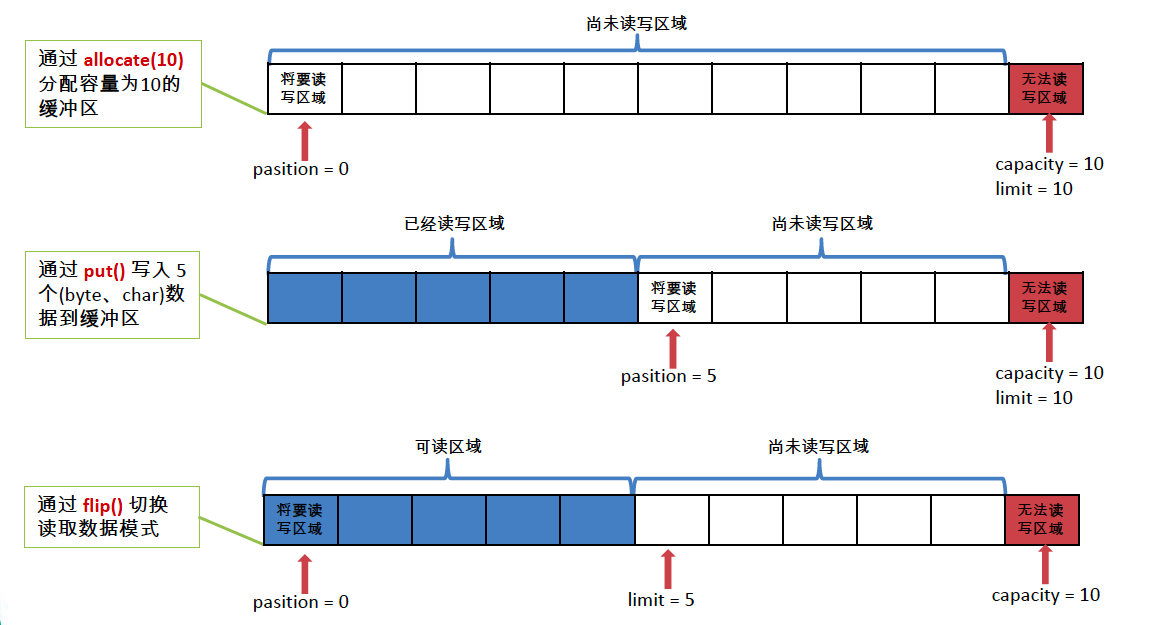
4个核心属性
- capacity : 容量,表示缓冲区中最大存储数据的容量。一旦声明不能改变。
- limit : 界限,表示缓冲区中可以操作数据的大小。(limit 后数据不能进行读写)
- position : 位置,表示缓冲区中正在操作数据的位置。
- mark : 标记,表示记录当前 position 的位置。可以通过 reset() 恢复到 mark 的位置
0 <= mark <= position <= limit <= capacity
public class TestBuffer {
    @Test
    public void test1(){
        String str = "abcde";

        //1. 分配一个指定大小的缓冲区
        ByteBuffer buf = ByteBuffer.allocate(1024);

        System.out.println("-----------------allocate()----------------");
        System.out.println(buf.position());//0
        System.out.println(buf.limit());//1024
        System.out.println(buf.capacity());//1024

        //2. 利用 put() 存入数据到缓冲区中
        buf.put(str.getBytes());

        System.out.println("-----------------put()----------------");
        System.out.println(buf.position());//5
        System.out.println(buf.limit());//1024
        System.out.println(buf.capacity());//1024

        //3. 切换读取数据模式
        buf.flip();

        System.out.println("-----------------flip()----------------");
        System.out.println(buf.position());//0
        System.out.println(buf.limit());//5
        System.out.println(buf.capacity());//1024

        //4. 利用 get() 读取缓冲区中的数据
        byte[] dst = new byte[buf.limit()];
        buf.get(dst);
        System.out.println(new String(dst, 0, dst.length));//abcde
        System.out.println("-----------------get()----------------");
        System.out.println(buf.position());//5
        System.out.println(buf.limit());//5
        System.out.println(buf.capacity());//1024

        //5. rewind() : 可重复读
        buf.rewind();

        System.out.println("-----------------rewind()----------------");
        System.out.println(buf.position());//0
        System.out.println(buf.limit());//5
        System.out.println(buf.capacity());//1024

        //6. clear() : 清空缓冲区. 但是缓冲区中的数据依然存在,但是处于“被遗忘”状态
        buf.clear();

        System.out.println("-----------------clear()----------------");
        System.out.println(buf.position());//0
        System.out.println(buf.limit());//1024
        System.out.println(buf.capacity());//1024
        System.out.println((char)buf.get());//a
    }

    @Test
    public void test2(){
        String str = "abcde";
        ByteBuffer buf = ByteBuffer.allocate(1024);
        buf.put(str.getBytes());

        buf.flip();

        byte[] dst = new byte[buf.limit()];
        buf.get(dst, 0, 2);
        System.out.println(new String(dst, 0, 2));//ab
        System.out.println(buf.position());//2

        //mark() : 标记
        buf.mark();

        buf.get(dst, 2, 2);
        System.out.println(new String(dst, 2, 2));//cd
        System.out.println(buf.position());//4

        //reset() : 恢复到 mark 的位置
        buf.reset();
        System.out.println(buf.position());//2

        //判断缓冲区中是否还有剩余数据
        if(buf.hasRemaining()){
            //获取缓冲区中可以操作的数量
            System.out.println(buf.remaining());//3
        }
    }

}
Buffer的常用方法
| IO | NIO |
|---|---|
| Buffer clear() | 清空缓冲区并返回对缓冲区的引用 |
| Buffer flip() | 将缓冲区的界限设置为当前位置,并将当前位置重置为0 |
| int capacity() | 返回Buffer 的capacity大小 |
| boolean hasRemaining() | 判断缓冲区中是否还有元素 |
| int limit() | 返回Buffer 的界限(limit) 的位置 |
| Buffer limit(int n) | 将设置缓冲区界限为n, 并返回一个具有新limit 的缓冲区对象 |
| Buffer mark() | 对缓冲区设置标记 |
| int position() | 返回缓冲区的当前位置position |
| Buffer position(int n) | 将设置缓冲区的当前位置为n , 并返回修改后的Buffer 对象 |
| int remaining() | 返回position 和limit 之间的元素个数 |
| Buffer reset() | 将位置position 转到以前设置的mark 所在的位置 |
| Buffer rewind() | 将位置设为为0,取消设置的mark |
直接与非直接缓冲区
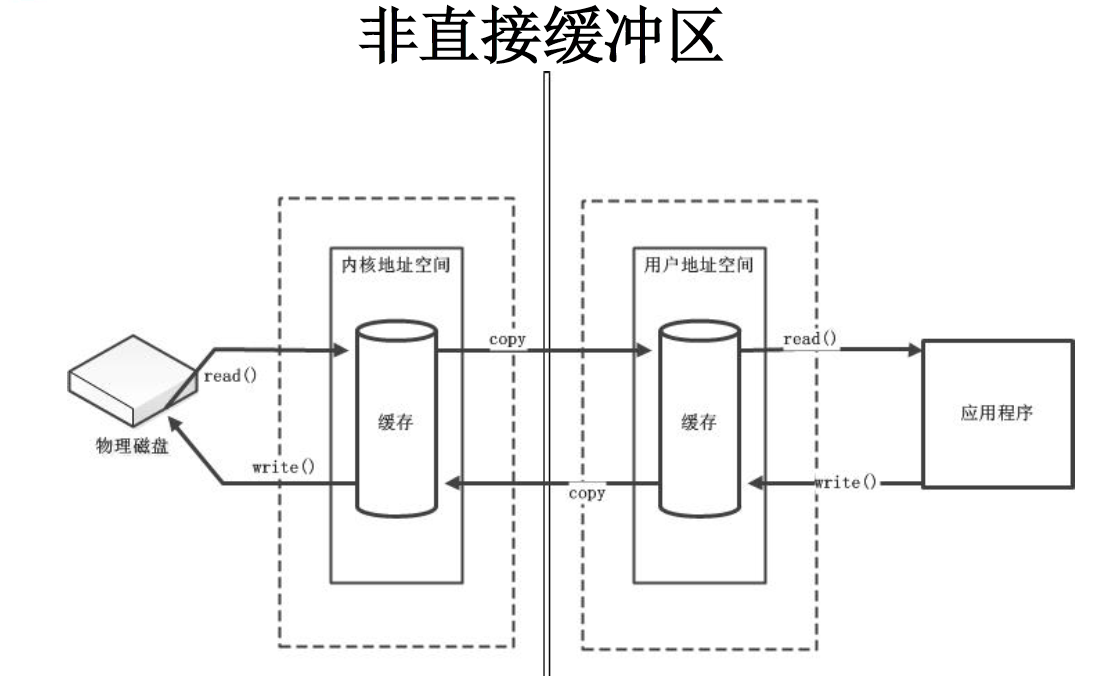
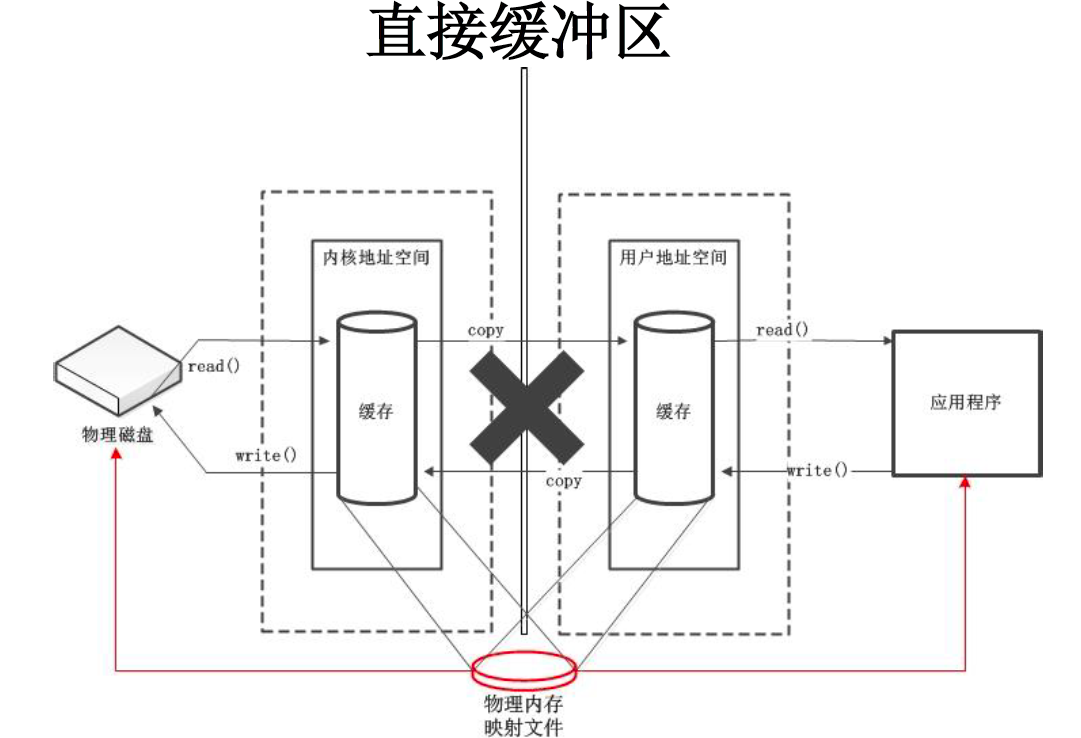
- 字节缓冲区要么是直接的,要么是非直接的。如果为直接字节缓冲区,则Java 虚拟机会尽最大努力直接在此缓冲区上执行本机I/O 操作。也就是说,在每次调用基础操作系统的一个本机I/O 操作之前(或之后),虚拟机都会尽量避免将缓冲区的内容复制到中间缓冲区中(或从中间缓冲区中复制内容)。
- 直接字节缓冲区可以通过调用此类的allocateDirect() 工厂方法来创建。此方法返回的缓冲区进行分配和取消分配所需成本通常高于非直接缓冲区。直接缓冲区的内容可以驻留在常规的垃圾回收堆之外,因此,它们对应用程序的内存需求量造成的影响可能并不明显。所以,建议将直接缓冲区主要分配给那些易受基础系统的本机I/O 操作影响的大型、持久的缓冲区。一般情况下,最好仅在直接缓冲区能在程序性能方面带来明显好处时分配它们。
- 直接字节缓冲区还可以通过FileChannel 的map() 方法将文件区域直接映射到内存中来创建。该方法返回MappedByteBuffer。Java 平台的实现有助于通过JNI 从本机代码创建直接字节缓冲区。如果以上这些缓冲区中的某个缓冲区实例指的是不可访问的内存区域,则试图访问该区域不会更改该缓冲区的内容,并且将会在访问期间或稍后的某个时间导致抛出不确定的异常。
- 字节缓冲区是直接缓冲区还是非直接缓冲区可通过调用其isDirect()方法来确定。提供此方法是为了能够在性能关键型代码中执行显式缓冲区管理。
- 非直接缓冲区:通过 allocate() 方法分配缓冲区,将缓冲区建立在 JVM 的内存中
- 直接缓冲区:通过 allocateDirect() 方法分配直接缓冲区,将缓冲区建立在物理内存中。可以提高效率
//分配直接缓冲区
ByteBuffer buf = ByteBuffer.allocateDirect(1024);
System.out.println(buf.isDirect());//true
Channel(通道)
用于源节点与目标节点的连接。在 Java NIO 中负责缓冲区中数据的传输。Channel 本身不存储数据,因此需要配合缓冲区进行传输
通道的主要实现类
java.nio.channels.Channel 接口:
- FileChannel : 用于读取、写入、映射和操作文件的通道
- SocketChannel : 通过TCP 读写网络中的数据
- ServerSocketChannel : 可以监听新进来的TCP 连接,对每一个新进来的连接都会创建一个SocketChannel
- DatagramChannel : 通过UDP 读写网络中的数据通道
获取通道的方式
-
Java 针对支持通道的类提供了 getChannel() 方法
本地 IO:
- FileInputStream/FileOutputStream
- RandomAccessFile
网络IO:
- Socket
- ServerSocket
- DatagramSocket
-
在 JDK 1.7 中的 NIO.2 针对各个通道提供了静态方法 open()
-
在 JDK 1.7 中的 NIO.2 的 Files 工具类的 newByteChannel()
public class TestChannel {
    //使用直接缓冲区完成文件的复制(内存映射文件)
    @Test
    public void test2() throws IOException{//2127-1902-1777
        long start = System.currentTimeMillis();

        FileChannel inChannel = FileChannel.open(Paths.get("d:/1.mkv"), StandardOpenOption.READ);
        FileChannel outChannel = FileChannel.open(Paths.get("d:/2.mkv"), StandardOpenOption.WRITE, StandardOpenOption.READ, StandardOpenOption.CREATE);

        //内存映射文件
        MappedByteBuffer inMappedBuf = inChannel.map(MapMode.READ_ONLY, 0, inChannel.size());
        MappedByteBuffer outMappedBuf = outChannel.map(MapMode.READ_WRITE, 0, inChannel.size());

        //直接对缓冲区进行数据的读写操作
        byte[] dst = new byte[inMappedBuf.limit()];
        inMappedBuf.get(dst);
        outMappedBuf.put(dst);

        inChannel.close();
        outChannel.close();

        long end = System.currentTimeMillis();
        System.out.println("耗费时间为:" + (end - start));
    }

    //利用通道完成文件的复制(非直接缓冲区)
    @Test
    public void test1(){//10874-10953
        long start = System.currentTimeMillis();

        FileInputStream fis = null;
        FileOutputStream fos = null;
        //①获取通道
        FileChannel inChannel = null;
        FileChannel outChannel = null;
        try {
            fis = new FileInputStream("d:/1.mkv");
            fos = new FileOutputStream("d:/2.mkv");

            inChannel = fis.getChannel();
            outChannel = fos.getChannel();

            //②分配指定大小的缓冲区
            ByteBuffer buf = ByteBuffer.allocate(1024);

            //③将通道中的数据存入缓冲区中
            while(inChannel.read(buf) != -1){
                buf.flip(); //切换读取数据的模式
                //④将缓冲区中的数据写入通道中
                outChannel.write(buf);
                buf.clear(); //清空缓冲区
            }
        } catch (IOException e) {
            e.printStackTrace();
        } finally {
            if(outChannel != null){
                try {
                    outChannel.close();
                } catch (IOException e) {
                    e.printStackTrace();
                }
            }

            if(inChannel != null){
                try {
                    inChannel.close();
                } catch (IOException e) {
                    e.printStackTrace();
                }
            }

            if(fos != null){
                try {
                    fos.close();
                } catch (IOException e) {
                    e.printStackTrace();
                }
            }

            if(fis != null){
                try {
                    fis.close();
                } catch (IOException e) {
                    e.printStackTrace();
                }
            }
        }

        long end = System.currentTimeMillis();
        System.out.println("耗费时间为:" + (end - start));

    }

}
通道之间的数据传输
- transferFrom()
- transferTo()
public class TestChannel{
   //通道之间的数据传输(直接缓冲区)
   @Test
   public void test3() throws IOException{
       FileChannel inChannel = FileChannel.open(Paths.get("d:/1.mkv"), StandardOpenOption.READ);
       FileChannel outChannel = FileChannel.open(Paths.get("d:/2.mkv"), StandardOpenOption.WRITE, StandardOpenOption.READ, StandardOpenOption.CREATE);

//      inChannel.transferTo(0, inChannel.size(), outChannel);
       outChannel.transferFrom(inChannel, 0, inChannel.size());

       inChannel.close();
       outChannel.close();
   }
}
分散(Scatter)与聚集(Gather)
- 分散读取(Scattering Reads):将通道中的数据分散到多个缓冲区中
- 聚集写入(Gathering Writes):将多个缓冲区中的数据聚集到通道中
public class TestChannel{
//分散和聚集
   @Test
   public void test4() throws IOException{
       RandomAccessFile raf1 = new RandomAccessFile("1.txt", "rw");

       //1. 获取通道
       FileChannel channel1 = raf1.getChannel();

       //2. 分配指定大小的缓冲区
       ByteBuffer buf1 = ByteBuffer.allocate(100);
       ByteBuffer buf2 = ByteBuffer.allocate(1024);

       //3. 分散读取
       ByteBuffer[] bufs = {buf1, buf2};
       channel1.read(bufs);

       for (ByteBuffer byteBuffer : bufs) {
           byteBuffer.flip();
       }

       System.out.println(new String(bufs[0].array(), 0, bufs[0].limit()));
       System.out.println("-----------------");
       System.out.println(new String(bufs[1].array(), 0, bufs[1].limit()));

       //4. 聚集写入
       RandomAccessFile raf2 = new RandomAccessFile("2.txt", "rw");
       FileChannel channel2 = raf2.getChannel();

       channel2.write(bufs);
   }
}
字符集:Charset
- 编码:字符串 -> 字节数组
- 解码:字节数组 -> 字符串
public class TestChannel{
  //字符集
  @Test
  public void test6() throws IOException{
      Charset cs1 = Charset.forName("GBK");

      //获取编码器
      CharsetEncoder ce = cs1.newEncoder();

      //获取解码器
      CharsetDecoder cd = cs1.newDecoder();

      CharBuffer cBuf = CharBuffer.allocate(1024);
      cBuf.put("天王盖地虎!");
      cBuf.flip();

      //编码
      ByteBuffer bBuf = ce.encode(cBuf);

      for (int i = 0; i < 12; i++) {
          System.out.println(bBuf.get());
      }

      //解码
      bBuf.flip();
      CharBuffer cBuf2 = cd.decode(bBuf);
      System.out.println(cBuf2.toString());

      System.out.println("------------------------------------------------------");

      Charset cs2 = Charset.forName("utf-8");
      bBuf.flip();
      CharBuffer cBuf3 = cs2.decode(bBuf);
      System.out.println(cBuf3.toString());
  }

  //遍历编码
  @Test
  public void test5(){
      Map<String, Charset> map = Charset.availableCharsets();

      Set<Entry<String, Charset>> set = map.entrySet();

      for (Entry<String, Charset> entry : set) {
          System.out.println(entry.getKey() + "=" + entry.getValue());
      }
  }
}
网络通信
- 传统的IO 流都是阻塞式的。也就是说,当一个线程调用read() 或write() 时,该线程被阻塞,直到有一些数据被读取或写入,该线程在此期间不能执行其他任务。因此,在完成网络通信进行IO 操作时,由于线程会阻塞,所以服务器端必须为每个客户端都提供一个独立的线程进行处理,当服务器端需要处理大量客户端时,性能急剧下降。
- Java NIO 是非阻塞模式的。当线程从某通道进行读写数据时,若没有数据可用时,该线程可以进行其他任务。线程通常将非阻塞IO 的空闲时间用于在其他通道上执行IO 操作,所以单独的线程可以管理多个输入和输出通道。因此,NIO 可以让服务器端使用一个或有限几个线程来同时处理连接到服务器端的所有客户端
NIO 完成网络通信的三个核心
- 通道(Channel):负责连接
java.nio.channels.Channel 接口:
SelectableChannel
SocketChannel
ServerSocketChannel
DatagramChannel
Pipe.SinkChannel
Pipe.SourceChannel
- 缓冲区(Buffer):负责数据的存取
- 选择器(Selector):是 SelectableChannel 的多路复用器。用于监控 SelectableChannel 的 IO 状况
阻塞式示例
详见Githubjava-learning项目
非阻塞式
选择器(Selector)
选择器(Selector)是SelectableChannle 对象的多路复用器,Selector 可以同时监控多个SelectableChannel 的IO 状况,也就是说,利用Selector 可使一个单独的线程管理多个Channel。Selector 是非阻塞IO 的核心
- 创建Selector :通过调用Selector.open() 方法创建一个Selector。
- 向选择器注册通道:SelectableChannel.register(Selector sel, int ops)
- 当调用register(Selector sel, int ops) 将通道注册选择器时,选择器对通道的监听事件,需要通过第二个参数ops 指定
- 可以监听的事件类型(可使用SelectionKey 的四个常量表示):
读: SelectionKey.OP_READ (1)
写: SelectionKey.OP_WRITE (4)
连接: SelectionKey.OP_CONNECT(8)
接收: SelectionKey.OP_ACCEPT (16)
- 若注册时不止监听一个事件,则可以使用“位或”操作符连接
socketChannel serverSocketChannel
非阻塞式示例代码
详见Githubjava-learning项目
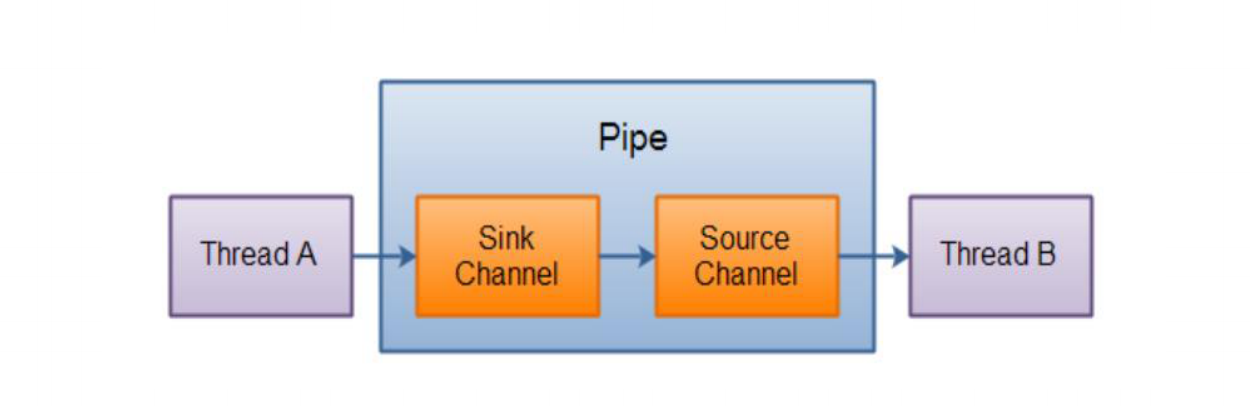
管道(Pip)
Java NIO 管道是2个线程之间的单向数据连接。
Pipe有一个source通道和一个sink通道。数据会
被写到sink通道,从source通道读取